
How to track multiple job searches at once
You may be considering a stretch role, a safer lateral move or more than one location. Separate searches preserve those different rules; one very broad alert usually hides why each result appeared.
Think about what you're actually looking for right now. In truth, it's probably not one thing. It might be a senior role you'd be thrilled to land and a safer lateral move you'd happily take if the stretch one doesn't come off. It might be two cities, because you'd relocate for the right job but not for an average one. It might be your core field plus a quiet side-hunt into an adjacent one you've been curious about for a year.
Those are different searches. They may need different titles, locations or industries. Combining them can produce a feed that is broad enough to obscure the reason each role matched, especially when one search has much more volume than the others.
That's the problem worth solving. Not "how do I get more job alerts", but "how do I run my two or three real searches in parallel without them bleeding into each other".
Why one search can't do the job
A job search is defined by a set of filters: the titles you want, the locations you'll consider, the seniority, the work arrangement, the industries. A good search is tight - narrow enough that almost everything it surfaces is worth a look. That tightness is exactly what makes it useful, and exactly why it can only represent one intention at a time.
Watch what happens when you try to widen one search to cover two intentions:
- You want "Product Manager" in London and "Senior Product Manager, remote". Merge them and you now match remote junior PM roles in cities you'd never move to, and London senior roles that require five days in an office you'll never visit. The signal drops on both.
- You want data analyst roles in your current field and you're testing the water in UX research. Merge them and every digest is a blur of two careers, and you can't tell which one is actually hiring.
- You're open to contract and permanent, but the day rates and the locations differ. One search flattens that distinction into noise.
The instinct to widen comes from not wanting to miss anything. If the results stop being useful, split distinct intentions into separate searches and keep each one narrow enough to review.
Three useful ways to split a search
You do not need a search for every variation. Start with the split that changes what you would apply to or how you judge the result.
The stretch and the safety net
One search for the ambitious version of your next role (a step up in seniority, a more prestigious employer, a higher band). One for the dependable version (a lateral move, a known-quantity company, a faster path to an offer). You apply early to both, but you read them with different eyes. This is the most common split, and the most useful, because the two searches move at different speeds and you want to see them separately.
Two places
You'd relocate to Manchester or Edinburgh for something excellent, but you'd only take something local if it's merely good. Those are two different bars, so they're two different searches. Keeping them apart stops the flood of one city from burying the trickle of the other.
The pivot alongside the core
You may not be leaving your field, but you want evidence about whether your skills travel. Keep the established search separate from an exploratory one in the adjacent field. Current adverts reveal the titles, stated pay and requirements employers are using, without pretending one feed settles whether the pivot will work. Our career-change guide shows how to use that evidence.
Set it up so it stays readable
Running parallel searches only works if the tooling keeps them genuinely separate. On FirstPost, saved searches are built for exactly this: each one holds its own titles, industries, seniority, work arrangement, locations and exclusions, and anything matching any of your searches lands in the same daily feed and digest, clearly attributed to the search that caught it.
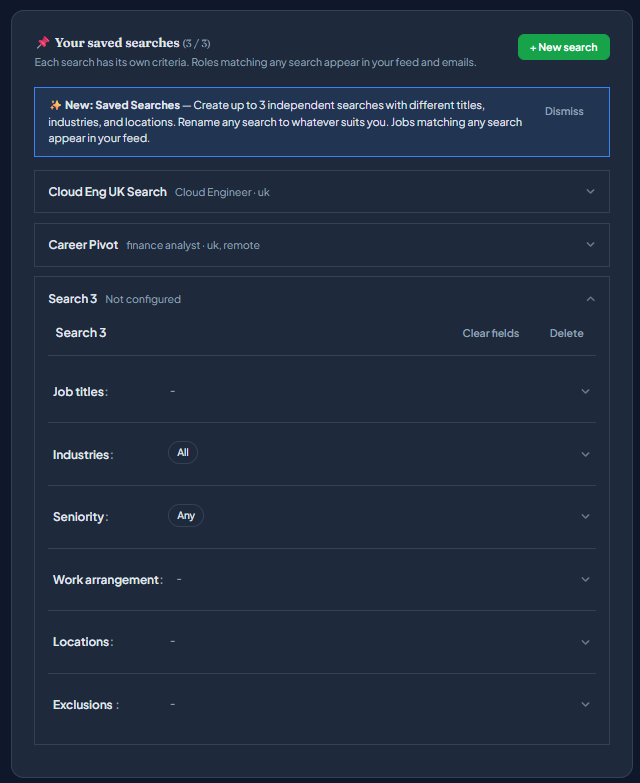
A few habits keep the searches readable:
- Name each search for its intention, not its filters. "Career pivot" and "Safe lateral" tell you why a role appeared. "PM 2" doesn't.
- Keep each one narrow. The whole point of splitting is that each search can afford to be strict. Resist the urge to widen any single one back out - if a new intention appears, give it its own slot instead.
- Use exclusions to stop overlap. If two searches keep surfacing the same agency reposts or the same off-target title, exclude it in the search where it doesn't belong. Clean separation is what keeps the digest trustworthy.
- Prune. When a search has done its job (you've taken the role, or ruled out the pivot), clear the slot and give it to the next question. Two live, sharp searches beat three stale ones.
Why this compounds with applying early
There's a reason this matters beyond tidiness. The entire case for monitoring roles directly is about being in the first batch of applicants rather than arriving days late from an aggregator digest. That advantage is per-role. If you're only watching one of your two real searches closely, you're early on half your opportunities and late on the other half - which is to say, you've handed back the advantage on every role in the search you neglected.
Parallel searches give each genuine intention the same monitoring rhythm. That makes it easier to find a suitable role at the source and apply before its queue builds, without inventing a precise applicant number. Our guide to applying early covers the routine; saved searches point it at more than one target.
Where it stops working
More searches are not automatically better. The right number is the number of genuinely distinct intentions you can review and act on. If you cannot explain why one search exists and how it differs from another, combine or remove it.
Run the searches you'd actually act on. Keep each one tight enough that opening the digest is a pleasure rather than a chore. And when one of them lands you the role, retire it without ceremony and point the slot at whatever you're chasing next. You can set up your first searches on FirstPost free.